Afsnitsforfatter: Danielle J. Navarro and David R. Foxcroft
Running an ANOVA in jamovi
I am pretty sure I know what you are thinking after reading the last section, especially if you followed my advice and did all of that by pencil and paper (i.e., in a spreadsheet) yourself. Doing the ANOVA calculations yourself sucks. There is quite a lot of calculations that we needed to do along the way, and it would be tedious to have to do this over and over again every time you wanted to do an ANOVA.
Using jamovi to specify your ANOVA
To make life easier for you, jamovi can do ANOVA… hurrah! Go to the ANOVA
→ ANOVA analysis, and move the mood.gain variable across so it is in
the Dependent Variable box, and then move the drug variable across so
it is in the Fixed Factors box. This should give the results as shown in
figur 154.[1] Note I have also checked the η² checkbox, pronounced
“eta” squared, under the Effect Size option and this is also shown on the
results table. We will come back to effect sizes a bit later.
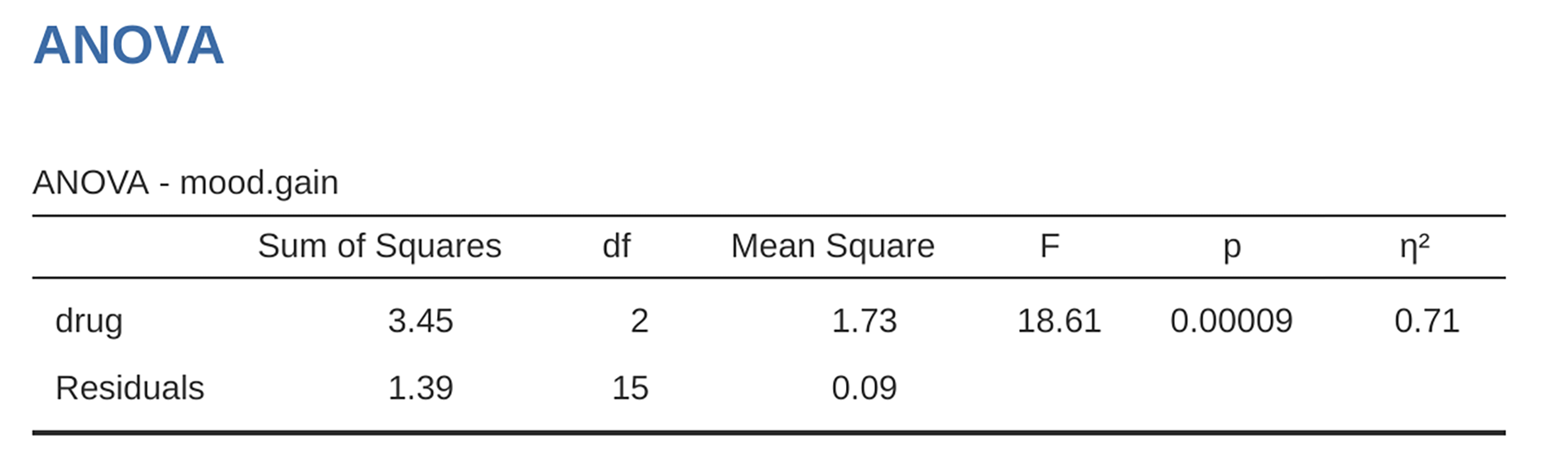
figur 154 jamovi ANOVA results table for mood.gain by drug administered
The jamovi results table shows you the sums of squares values, the degrees of
freedom, and a couple of other quantities that we are not really interested in
right now. Notice, however, that jamovi does not use the names “between-group”
and “within-group”. Instead, it tries to assign more meaningful names. In our
particular example, the between groups variance corresponds to the effect
that the drug has on the outcome variable, and the within groups variance
corresponds to the “leftover” variability so it calls that the residuals. If
we compare these numbers to the numbers that I calculated by hand in section
A worked example, you can see that they are more
or less the same, apart from rounding errors. The between groups sums of
squares is SSb = 3.45, the within groups sums of squares is
SSw = 1.39, and the degrees of freedom are 2 and 15 respectively. We
also get the F-value and the p-value and, again, these are more or less the
same, give or take rounding errors, to the numbers that we calculated ourselves
when doing it the long and tedious way.